Release Notes - Katalon TestOps
Jan 14, 2026
New feature
✨ New: ZIP Repository Upload: You can now upload Katalon Studio projects directly to TestOps as ZIP files.
- Key capabilities:
- Upload
.zipfiles containing valid Katalon Studio projects - Automatically extract and import test cases, test suites, test suite collections.
- Create instant or scheduled automated test runs using test suites from uploaded ZIP repositories, and analyze the results in TestOps.
- Upload
Enhancement
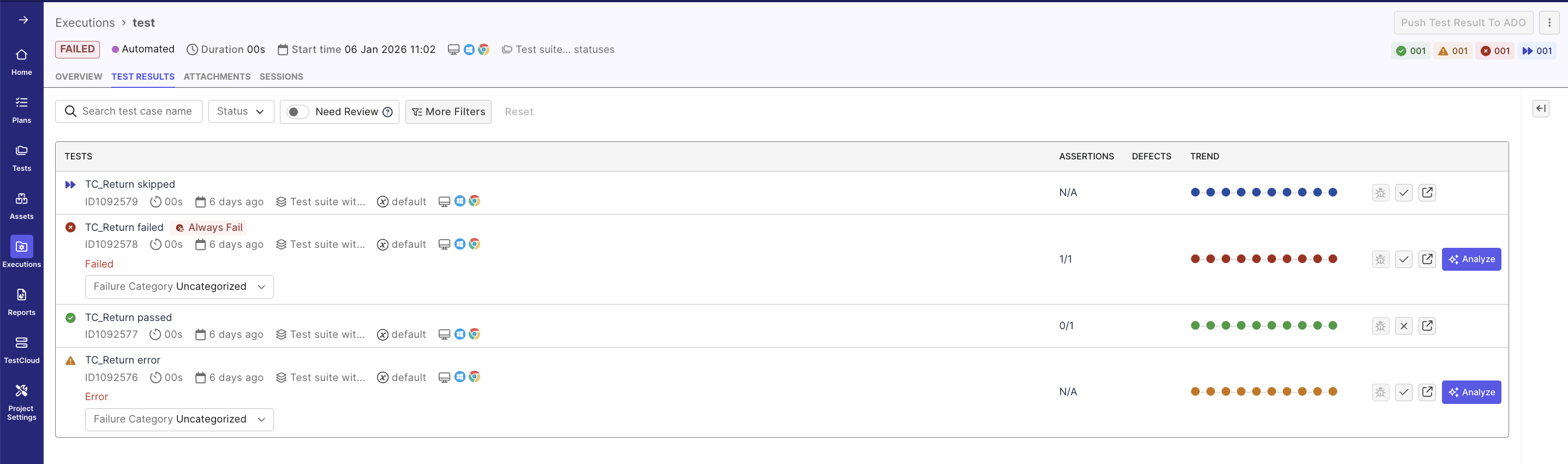
Redesigned the Test Result detail page UI to make test result analysis and management easier and more efficient.
Jan 7, 2026
New Region Available: EU Multi-Tenant SaaS: We’re excited to announce the launch of Katalon’s EU Multi-Tenant SaaS region, expanding our global footprint beyond the US for the first time.
- What’s new
- EU data residency for organizations that require it
- Same Katalon experience, now delivered from the EU
- Improved performance for teams based in Europe
- Designed for compliance-driven industries operating in the EU European teams can now use Katalon with greater confidence around data location, compliance, and performance, without changing how they work. This option is ideal for customers who explicitly require EU data residency due to regulatory, security, or regional performance needs.
Dec 22, 2025
Enhancements
Redesigned Analytics and Trends dashboard to include flaky, always failing, new failing, and slow test counts of the selected scope. This allows you to quickly understand test quality and drill down into detailed reports while maintaining filter context.

Dec 17, 2025
New features
-
Expanded Deletion Capabilities: TestOps now supports additional deletion actions, giving users greater control over data lifecycle management.
- Delete Account: Permanently remove unused accounts to support lifecycle management and compliance requirements.
- Delete Organization: Completely remove inactive or obsolete organizations and their associated data.
- Delete Project: Delete unused or deprecated projects to keep workspaces organized and manageable.
- Delete User Profile: Fully remove user profiles to support offboarding, access control, and data governance.
-
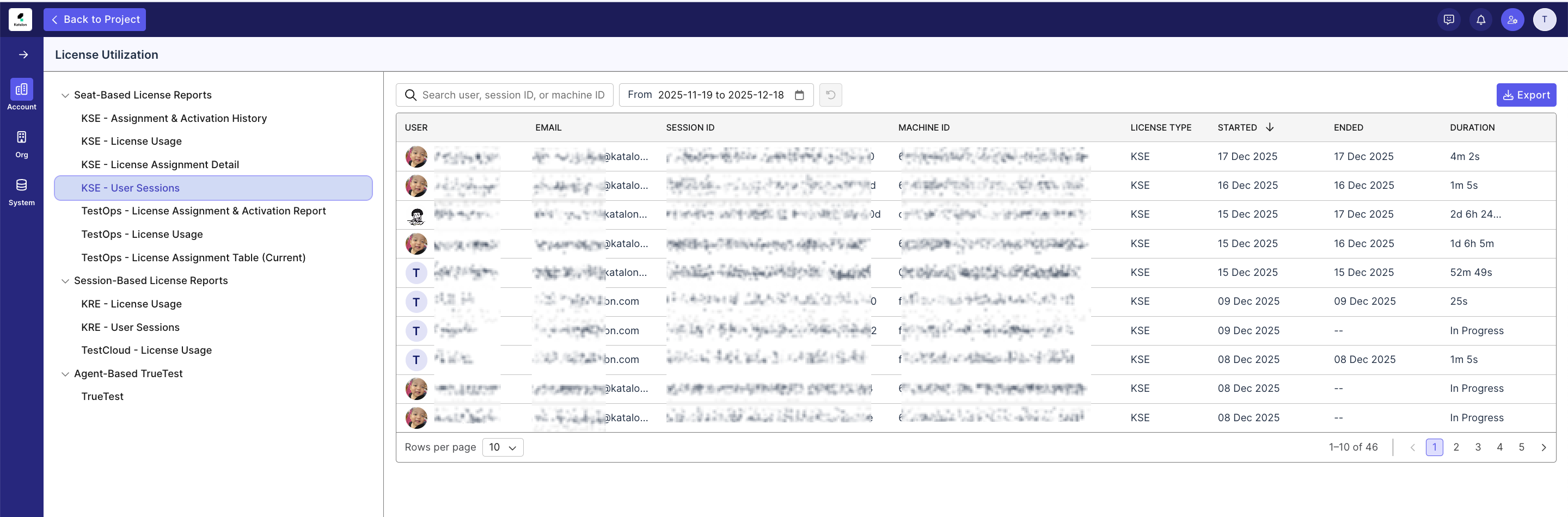
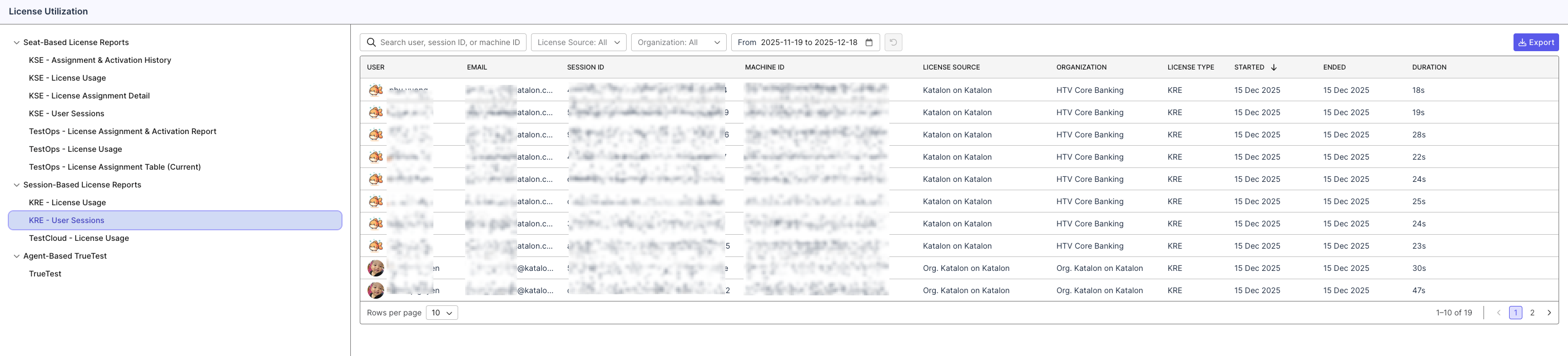
Added two new Session Duration reports for KSE and KRE:
- KSE User Session (Duration) Report: Track real user session usage while consuming Katalon Studio Enterprise (KSE) licenses. This report helps admins understand actual usage duration per member and optimize license allocation.
- KRE Execution Session (Duration) Report: Monitor real execution session duration per user for Katalon Runtime Engine (KRE) licenses, providing better transparency into runtime license consumption.
Enhancement
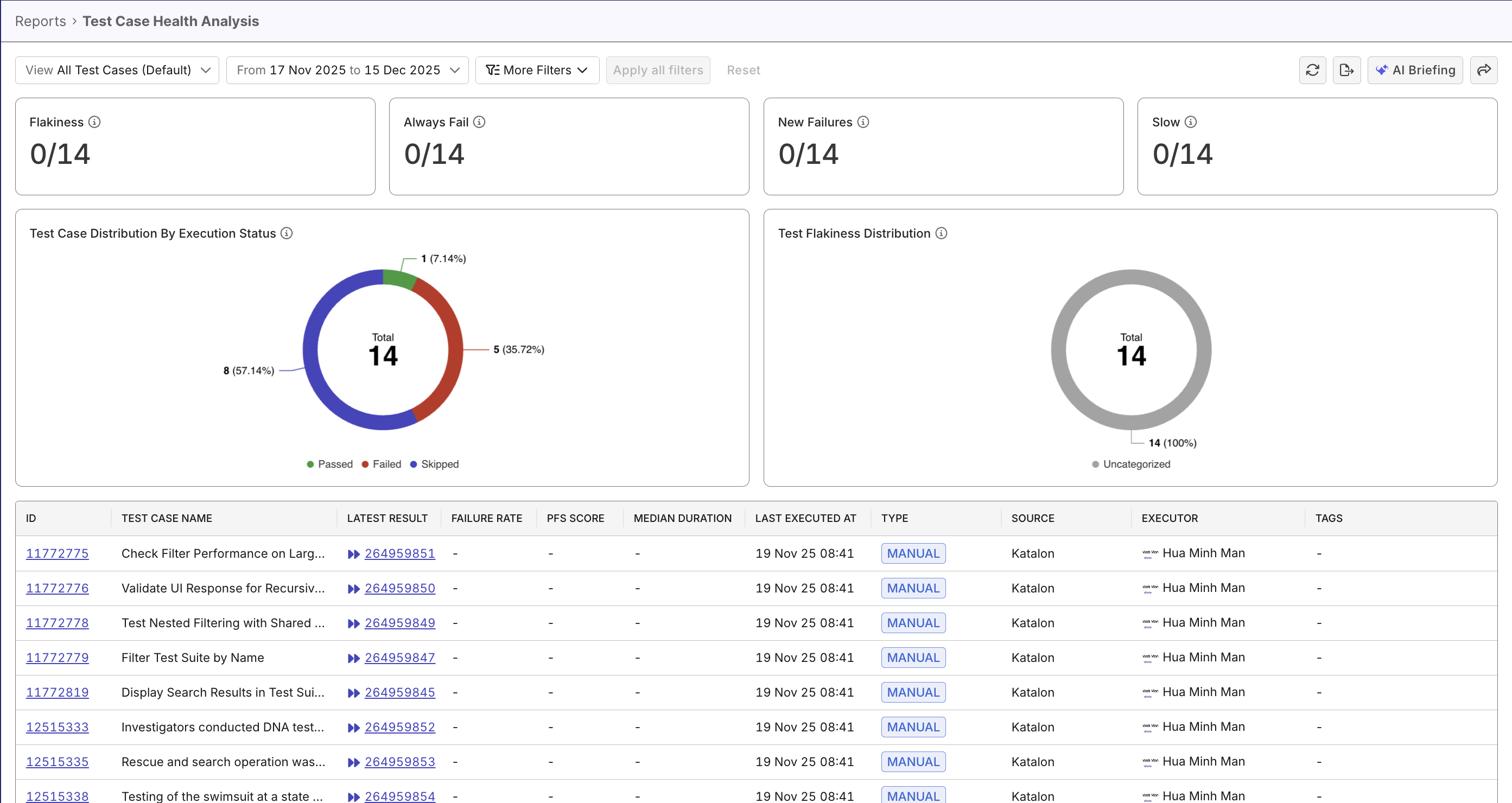
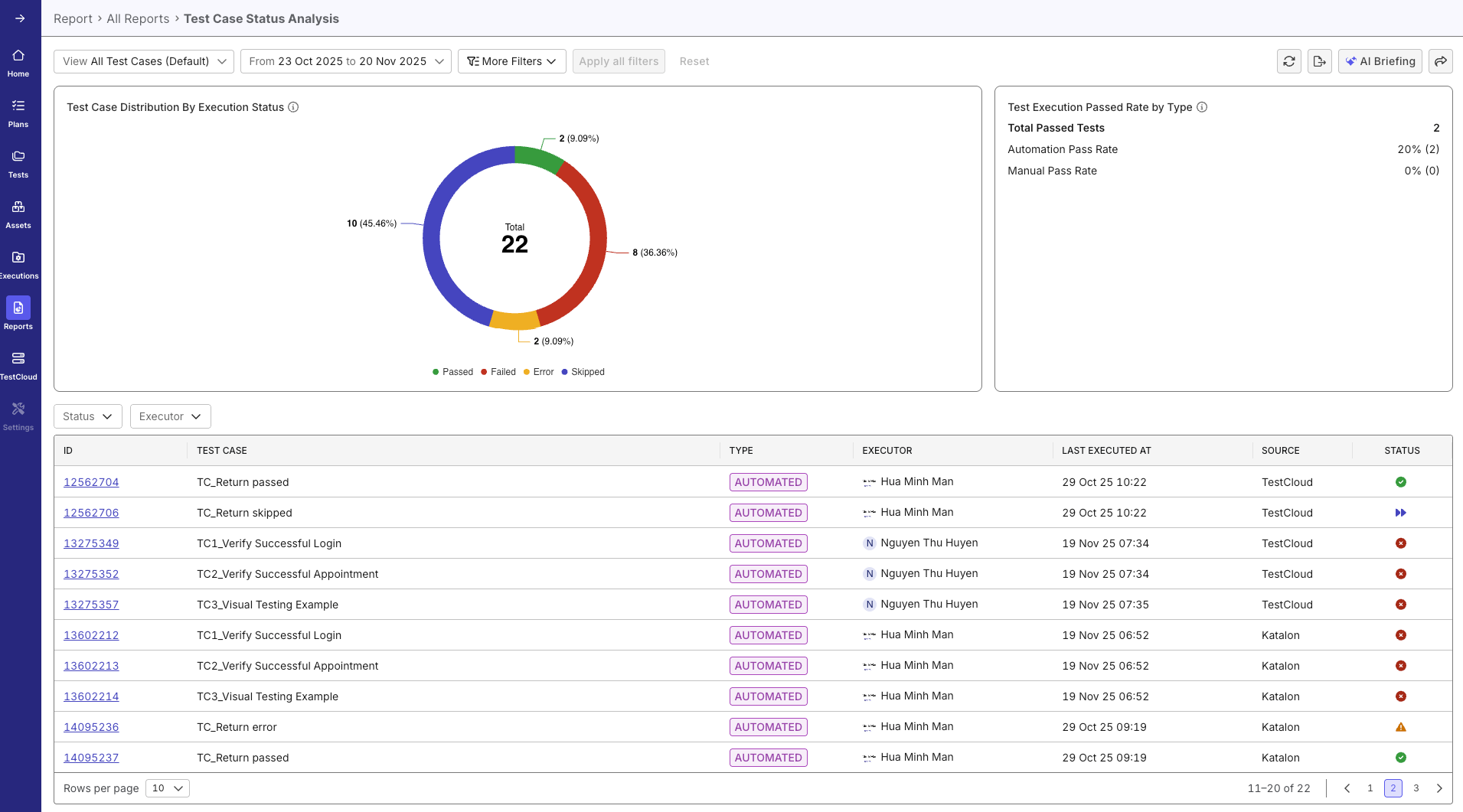
Included test stability metrics and charts in Test Case Status Analysis Report (now Test Case Health Analysis Report) for a better understanding into test case health.
Dec 10, 2025
New features
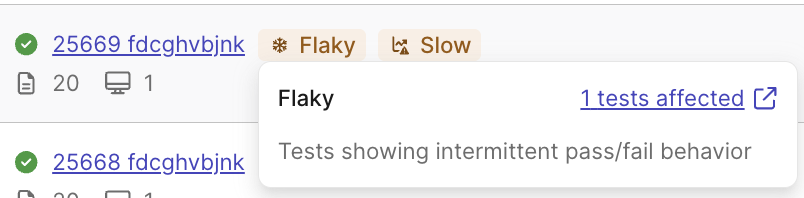
- Smart Tags: Gain immediate insight into flaky tests, recurring failures, and overall test health across your execution workflows. For details, refer to Smart Tags.
- Git Server Integration via Tunnel (GitHub Server & GitLab Server): Enable secure tunnel connectivity so TestOps can access private or on-prem GitHub Server and GitLab Server repositories without exposing them publicly. All Git workflows—repository detection, syncing, and execution—run entirely through the tunnel layer, allowing teams in highly regulated or restricted network environments to use either platform without changing their network posture.
Enhancements
-
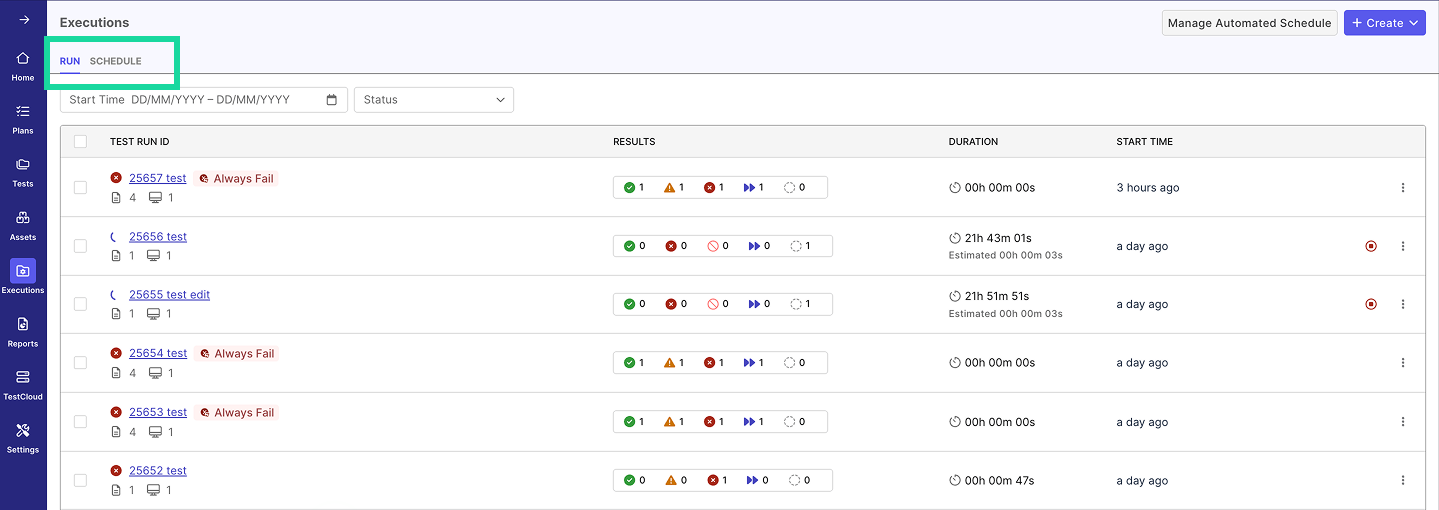
Redesigned Executions to make navigating and analyzing your test runs clearer and more efficient. It is now split into two dedicated sections—the Run and Schedule tabs—so you can manage ad-hoc runs and scheduled executions independently with better focus and organization.
-
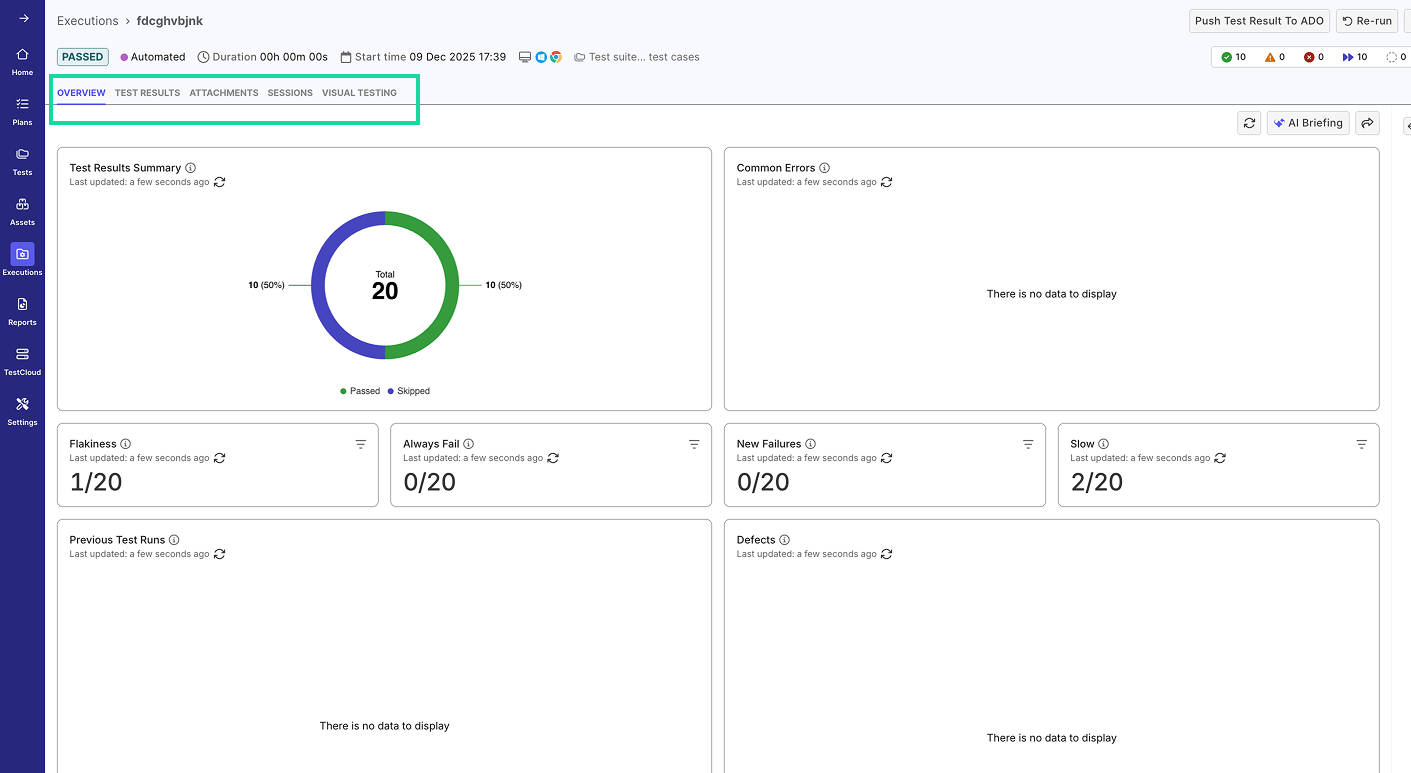
We’ve significantly expanded the capabilities of Manage Automated Schedule. Previously limited to bulk actions for scheduled automated runs, it now includes additional tabs—Test Results, Attachments, Visual Testing, and more—providing deeper visibility into execution quality and trends. Key improvements include:
- Overview – New widgets including results summary, common errors, run history, defect list, coverage by OS/browser, and failure category distribution.
- Test Results – Real-time execution updates with an improved results table and trend visibility.
- Attachments – Centralized files with preview, filtering, and search across logs, images, videos, reports, and metadata.
- Sessions – Enhanced session monitoring with grouped session details, log filtering, and downloadable logs.
- Visual Testing – Dedicated tab for streamlined visual testing review and accessibility.
To learn more, refer to Assess Automated Tests.
-
🚀 New MCP Tools Released for TestOps Analytics: We’ve added four new MCP tools that provide deeper, more actionable insights across your TestOps projects. You can use these tools to gain deeper insights into:
- Defect Insights: Retrieve enriched defect analytics, including trends by severity and priority for any sprint, release, or date range.
- Requirement Coverage Insights: Access comprehensive requirement coverage statistics—total requirements, coverage breakdown (fully, partially, not covered), and overall coverage rate—along with detailed requirement-level data such as requirement/issue ID, summary, type, linked/published/executed test cases, pass/fail counts, total defects, and coverage, testing, and quality status.
- Test Case Insights: Gain enhanced visibility into test execution with test case–level attributes, automation status, and granular execution metrics.
- Test Configuration Insights: Explore platform and configuration analytics, including executed test counts, coverage rates, pass/fail results, platform health indicators, usage patterns, and configuration-based execution outcomes.
Nov 26, 2025
New features
-
Jira Datacenter (On-Premises) Integration Support: You can now integrate Jira Datacenter projects with TestOps, enabling on-prem teams to connect their self-managed Jira instances and bring requirements and defects directly into TestOps. This update extends the same integrated workflow experience previously available only for Jira Cloud.
For more information on Jira DC Integration, go to this document.
-
You can now build custom widgets and add them directly to your Analytics & Trends dashboard. Custom widgets let you surface the exact KPIs and trends that matter - tailoring the dashboard to your project, your workflow, your goals.
- AI briefing can also pull data from custom widget, turning it into quick, ready-to-use summaries for fast decision-making.
Enhancement
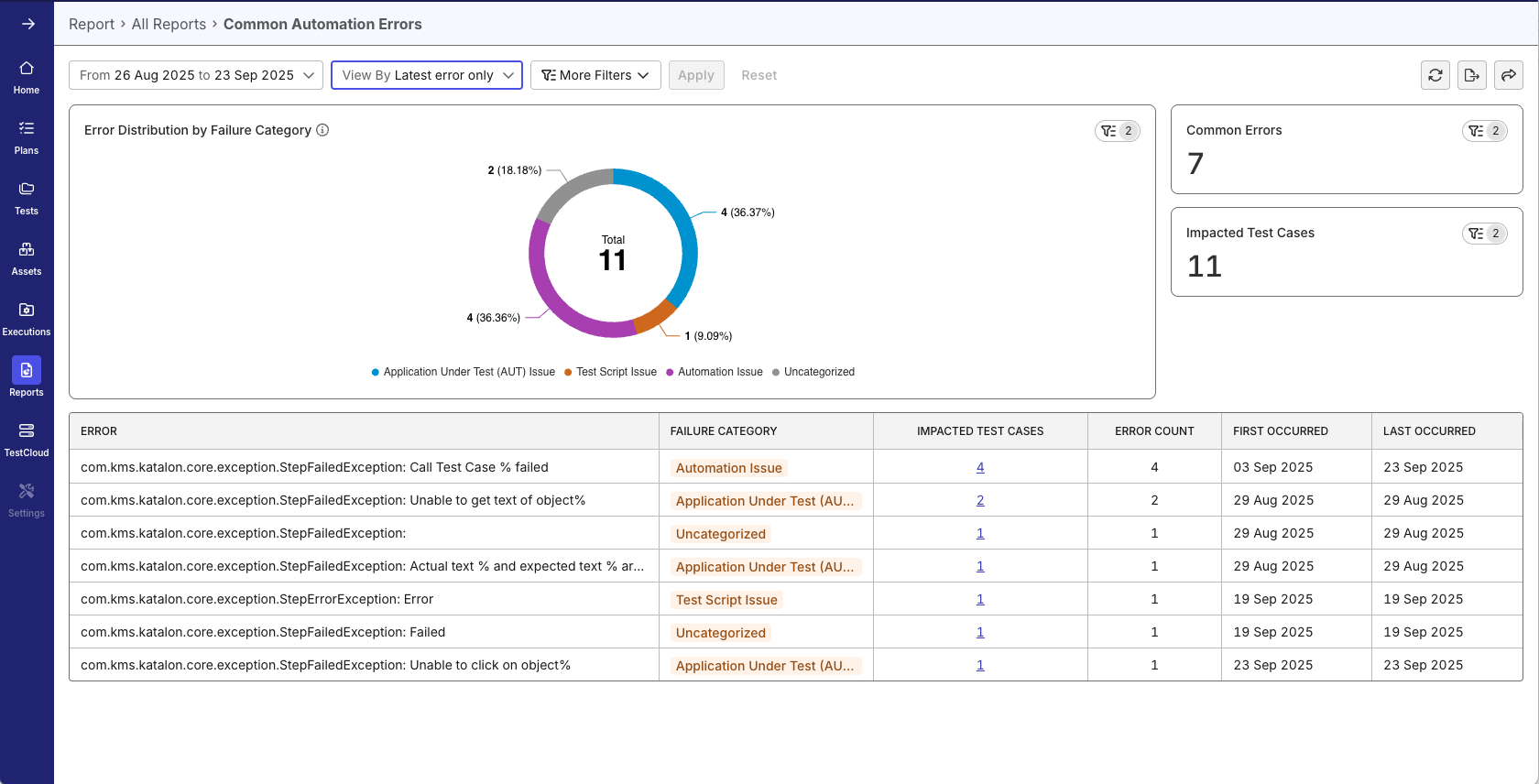
The Common Automation Errors report now groups automation errors by their Failure Category labels. This helps you understand quickly whether issues are caused by your application, test script, data, or an unknown pattern, without reading long descriptions.

Nov 19, 2025
New features
- Tag(s): Introduce a streamlined tagging system that helps teams organize and categorize test cases more efficiently.
- Tags stay automatically synchronized between Katalon Studio and TestOps
- Easily filter and manage test cases using flexible, customizable labels
- Save Filter Configurations as Views: This lets you save and reuse your filter configurations across reports and dashboards, so you can quickly switch between different analysis setups without reconfiguring filters each time.
-
Time Savings: Instantly access frequently-used filter combinations without manual reconfiguration
-
Consistency: Ensure team members analyze data using standardized filter sets when views are shared via URL
-
Flexibility: Quickly switch between different analytical perspectives (e.g., "Last Sprint Failures" vs. "Production Critical Issues")
-
Enhancement
Enhanced Test Case Status Analysis: The Test Case Status Analysis data table now includes the Source column, giving you complete context about where each test case originates and enabling better traceability across your test automation framework.
Nov 13, 2025
Enhancement
-
Added GitHub Server (On-Premises) Integration Support: You can now integrate with GitHub Server (on-prem) in addition to GitHub Cloud. This update allows teams using self-hosted GitHub instances to connect repositories and access the full range of GitHub-based workflows within the platform.
For more information on Github Server Integration, go to this document.
Oct 29, 2025
New features
-
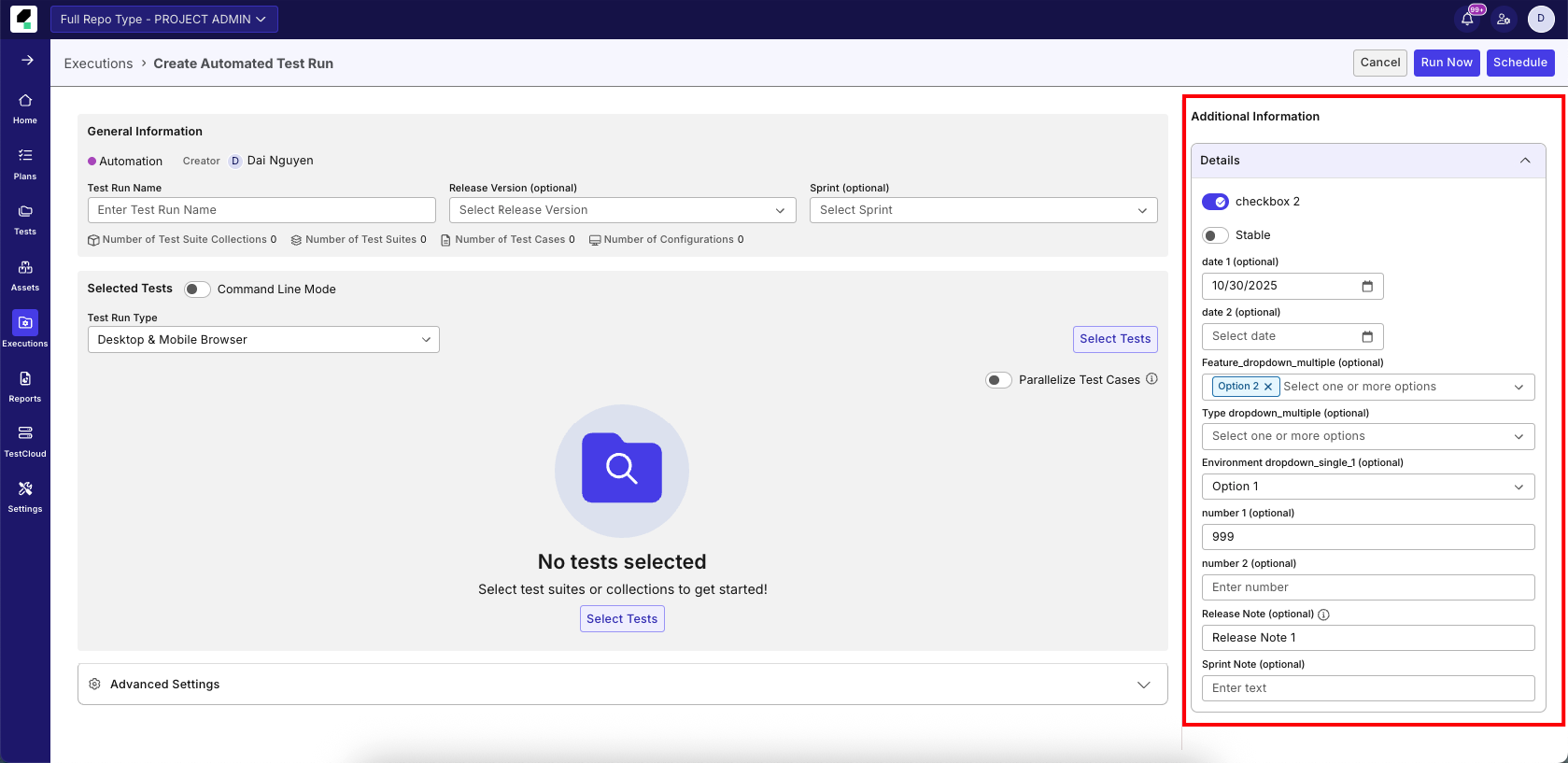
Customizable Fields: Extend TestOps to match your team's unique workflows and processes with flexible customizable field capabilities across multiple areas of the platform. Please refer to this document to learn more
-
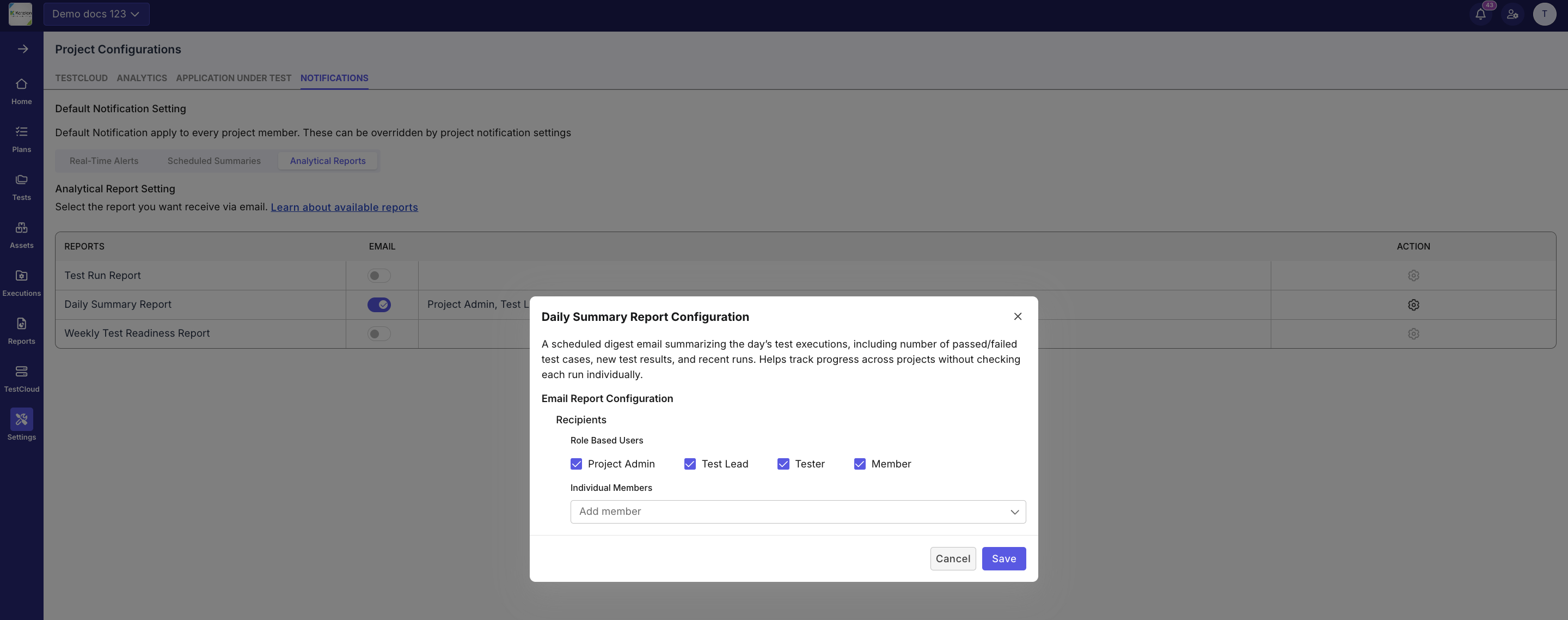
Project Notifications: Receive a daily digest email summarizing your test executions — including the number of passed and failed test cases, new results, and recent runs. It helps you easily track project progress without checking each run individually.
-
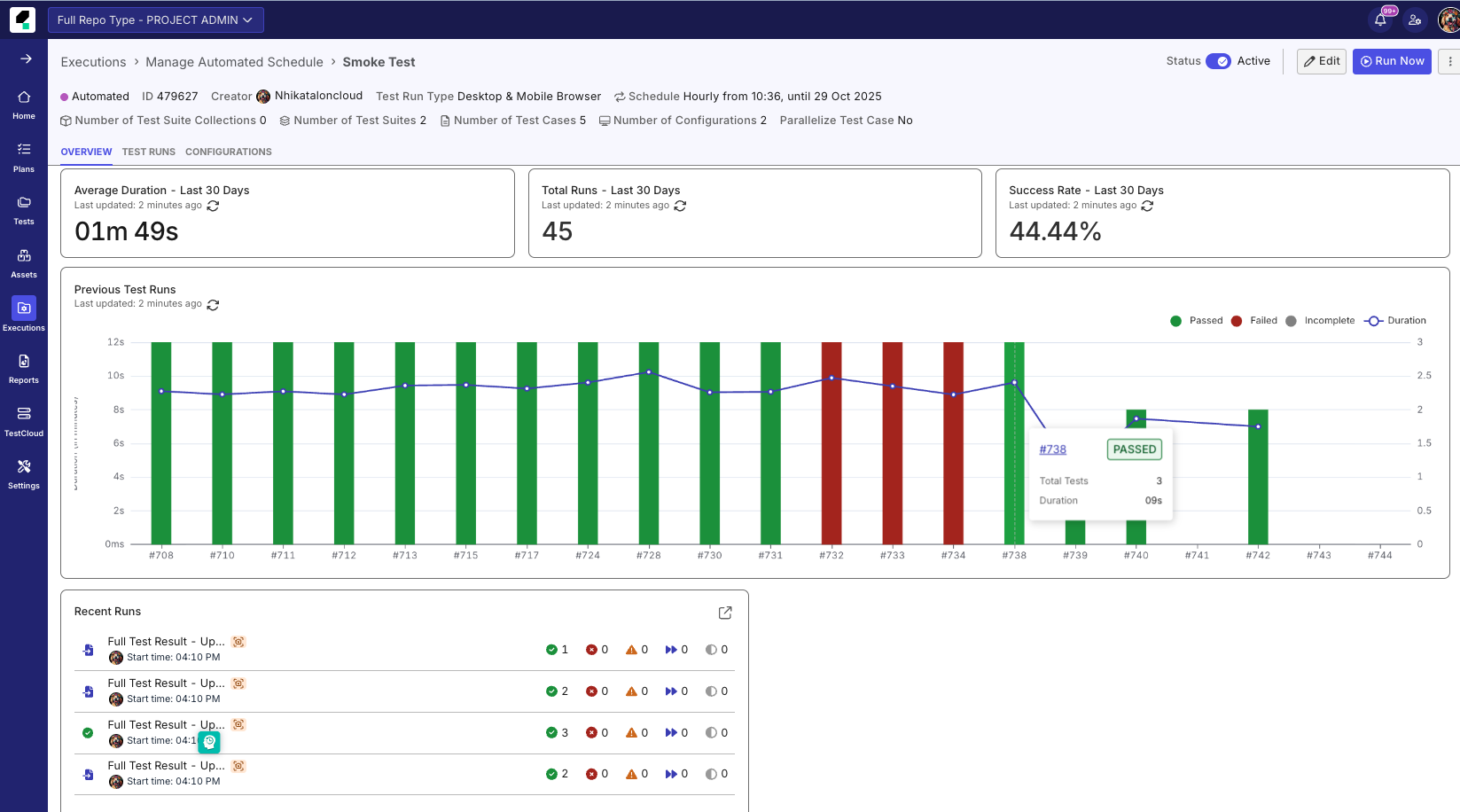
Schedule Overview Dashboard in Schedule Details:
- Get a complete view of your schedule performance in one place. Track key metrics such as average duration, success rate, and total runs over the last 30 days — all updated in real time. Visual charts highlight trends and test outcomes, helping you quickly identify issues, monitor progress, and make data-driven improvements.
- AI Briefing: Let AI do the heavy lifting. With a single click, generate an intelligent summary of your recent test executions.
Oct 22, 2025
New features
-
Introducing Manage Automated Schedule where you can manage multiple schedules at once, quickly turn runs on or off, and edit details with just a few clicks. The improved experience makes it effortless to adjust configurations, update settings, and review results — all in one place.
This update gives you a faster, smoother way to stay in control of your automated testing, so you can focus more on quality and less on setup.
-
Introducing AI-powered Manual to Automation Conversion — a seamless integration between Manual Testing and TrueTest. This feature enables testers to automatically convert manual execution sessions into automated test cases.
- Key benefits:
- Remove friction between manual and automation testers by aligning tools and workflows.
- Accelerate automation at scale by reducing manual scripting effort.
- Unify test strategy by connecting manual, automated, and AI-generated test cases in one platform. Learn more about this feature in our guide: Generate automated tests from manual executions.
- Key benefits:
Oct 16, 2025
New feature
📝 Personal Notification: Users can now set up project-level notifications via email in TestOps, allowing customization of reports for all or specific projects. You can tailor which reports to receive — such as Test Run Report or Daily Summary Report — and manage preferences across projects.
See this document for more details.
Oct 15, 2025
New feature
🤖 This release introduces the TestOps MCP Server, enabling seamless connection between Katalon TestOps and supported Large Language Models (LLMs) via the Model Context Protocol (MCP).
Users can now perform operations on Test Cases, Test Suites, Requirements, Sprints, and Releases directly through their LLM interface. After configuring the MCP server, you can create, update, move, duplicate, delete, and search TestOps objects — streamlining test management and improving automation efficiency.
Watch how Claude Desktop integrates with the TestOps MCP Server to analyze project data and summarize test activities. Refer to this TestOps MCP Server document to learn more.
Oct 8, 2025
Enhancements
-
📤 We’ve enhanced the AI Insights experience. You can now share AI-generated insights directly via email, making it easier to collaborate and keep your team aligned.
Additionally, you can use AI to re-write or format insights before sharing—perfect for polishing tone, structure, or clarity in just a few clicks.
-
Drill-Down for Error Analysis - Quickly investigate automation failures with new interactive drill-down features:
- Click any error category to filter results instantly
- View affected test cases with direct links to their latest and historical results
- Share investigation links with saved context
Oct 1, 2025
Enhancements
📝 Bulk Edit Profile & Configuration for Test Suite Collections – Quickly update execution profiles or configurations across all Test Suites in a collection with one action for faster, consistent setup.
Sep 23, 2025
New features
🚀 We’re excited to introduce powerful new ways to make sense of your test results and speed up decision-making:
- AI-Powered Dashboard & Report Briefings: No more sifting through dashboards. Get instant, AI-generated summaries that surface key trends, risks, and recommended actions—all in clear, actionable language. Perfect for quick stand-ups, release reviews, or executive updates.
✅ Works across both dashboards and reports. Demo below shows a dashboard example.
- Added Common Automation Error Report: Spot systemic issues faster. Our new report automatically groups recurring automation errors, helping teams focus on the problems that matter most instead of chasing one-off failures.
- Smarter Filtering: A cleaner, more intuitive filtering experience plus new options to drill down by execution profile, test suite, and test suite collection.
Sep 22, 2025
Enhancements
✨ Managing users just got a whole lot easier! With Bulk User Edit, you can now update multiple users at once—saving time, reducing repetitive work, and ensuring consistent settings across your team. Whether it’s adjusting roles, updating access, or applying changes to entire groups, you can handle it all in just a few clicks.
At the Account level, Account Admins can now:
- Update roles in a single action
- Assign or change organizations for multiple users simultaneously
- Modify license sources in bulk
- Adjust project assignments without repetitive manual steps
- At the Project-level, Project Admin can:
- Update user roles for multiple users at once
Sep 11, 2025
New features
This release brings powerful enhancements to TestOps for smarter, faster, and more efficient testing.
-
📌 Schedule & Execute Dynamic Test Suites: Run test suites that are dynamically generated or updated at runtime based on rules, criteria, or external data sources.
-
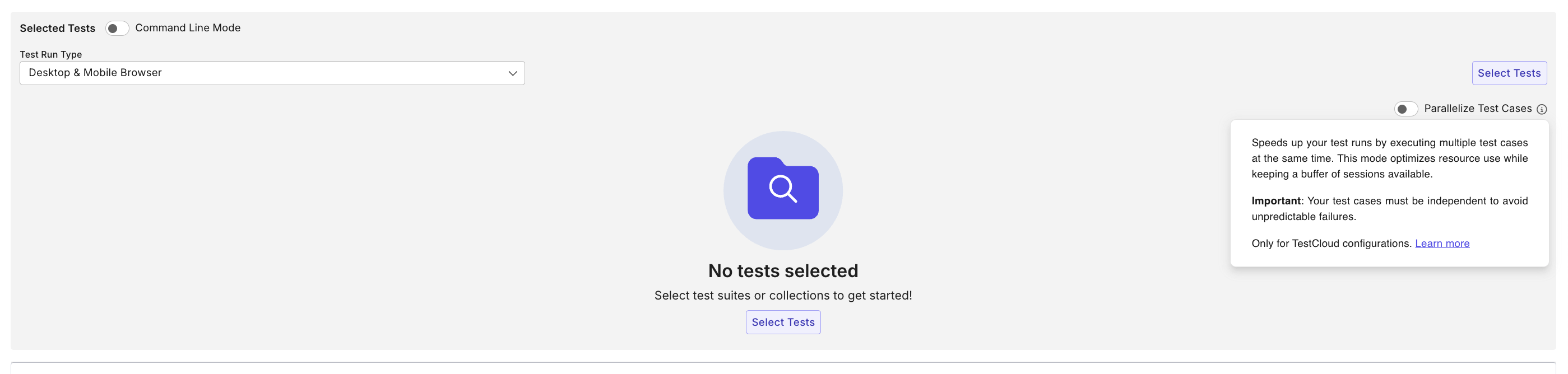
⚡ Parallel Test Case Execution: Enable Parallelize Test Cases mode to significantly reduce execution time by running test cases in parallel within a suite or across suites. Learn more in the Parallel Test Case Execution guide.
Sep 4, 2025
New features
🎉 Added System for Cross-domain Identity Management (SCIM) Integration for IdP Provisioning.
Benefits:
- Future-proofed for SSO/SCIM-based governance at enterprise scale
- Centralized identity management
- Reduces the need for manual admin intervention
Sep 3, 2025
New features
🎉 We’re excited to introduce AI-powered root cause analysis to help you diagnose test failures faster and more accurately. With this new capability, you can now analyze failures directly from the Test Result List or Test Result Summary, and receive intelligent insights to speed up debugging.
What’s Included:
- Failure Category Classification: Automatically identifies the type of failure (e.g., Application Under Test Issue, Environment Issue, Timing Issue, Broken Selector, Assertion Error) so you can quickly prioritize fixes.
- Plain-English Root Cause Summary: Translates complex errors into clear, human-readable explanations your whole team can understand.
- Actionable Recommendations: Provides practical next steps (like updating selectors, adjusting wait times, or checking application changes), complete with confidence scores to guide your decisions.
Aug 27, 2025
New features
-
Added the option for test suites to run through either the TestCloud Tunnel or TestCloud IP Whitelisting.
-
External Sharing for Analytics Dashboards via Email: Share your quality insights with stakeholders inside and outside your organization through our new secure external sharing capabilities.
-
CSV export for all reports: You can also export data from any report in CSV format for deeper analysis and custom reporting.
Enhancements
- Live Monitor Dashboard
- Added In-Progress Test Run Counter: A new widget that instantly displays the number of active test runs.
- Added Today’s Test Runs: View all test runs executed today, including start times and summarized results, for faster insights and actions.
July 30, 2025
New features
-
Introduced Katalon Account Manager access. This is a default administrative access automatically assigned to certain users in organizations that do not have a full TestOps subscription but still use Katalon products such as Katalon Studio Enterprise (KSE), Katalon Runtime Engine (KRE), or TestCloud.
-
Katalon TestOps now lets Account and System Admins centrally manage Katalon Studio settings, including AI auto-tagging, idle time-out behavior, version update alerts, and test result uploads — all from the Katalon Studio tab in Admin Settings.
-
Katalon now automatically monitors and enforces limits on session-based licenses (KRE & TestCloud) when your organization exceeds the purchased session quota. You will need to:
- Reallocate session licenses across organizations within 30 days of overage detection.
- Reduce session usage or purchase additional licenses if needed.
If no action is taken within 30 days:
- Session license allocations across organizations will be automatically reset to default.
- Affected features (like license assignment) will be restricted until compliance is restored.
-
You can now configure KPI widgets and thresholds directly in the Release Health tab to better assess readiness for release.
July 23, 2025
New features
-
Added
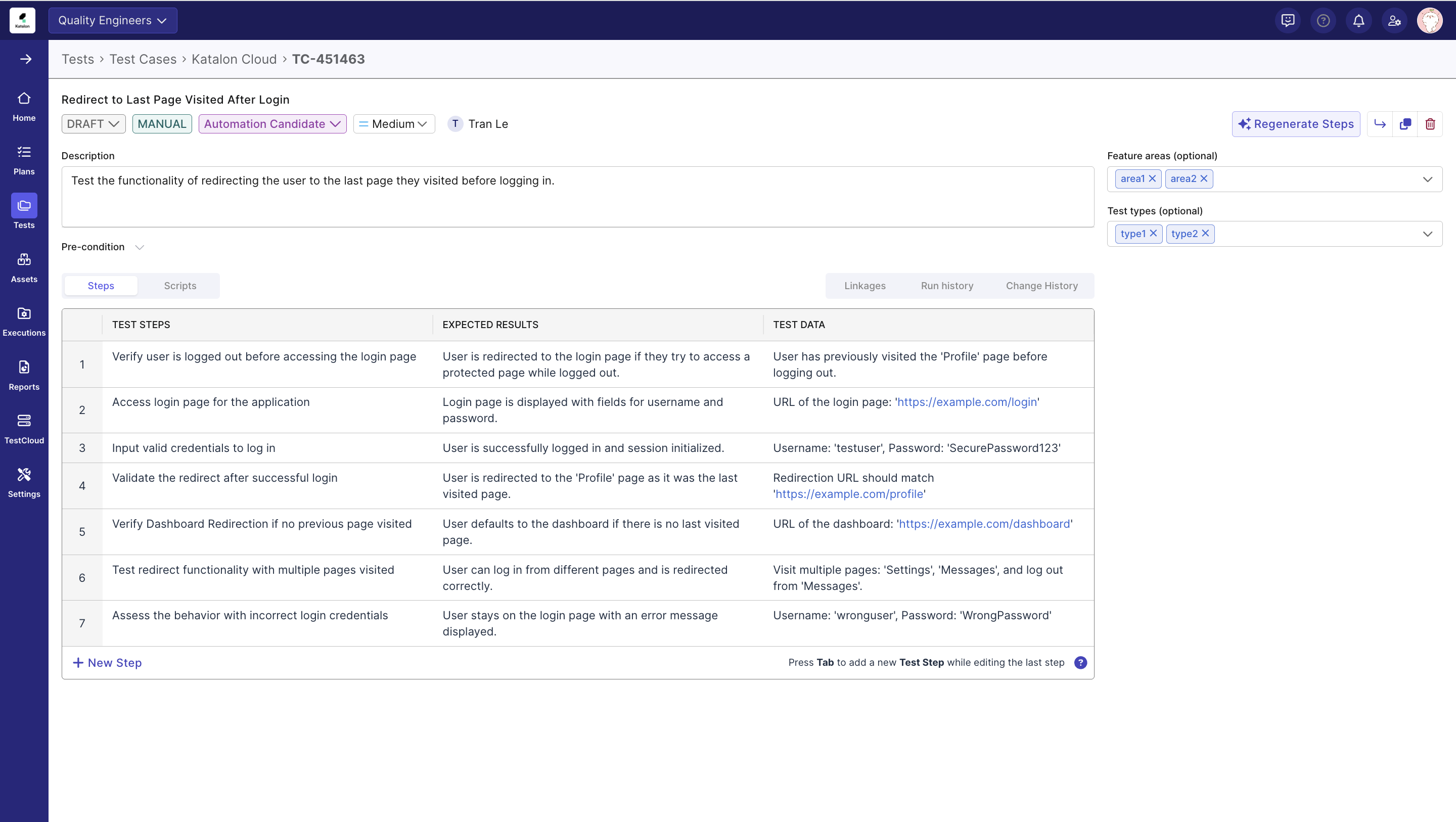
Assigneefield to test case import and creation. -
Test case Linking: Enable users to create direct relationships between test cases within the Test Management Module, allowing for better traceability and dependency management in test execution workflows.
July 16, 2025
New features
- Added two new fields:
Feature areas&Test typeto test case import and creation.
July 9, 2025
New features
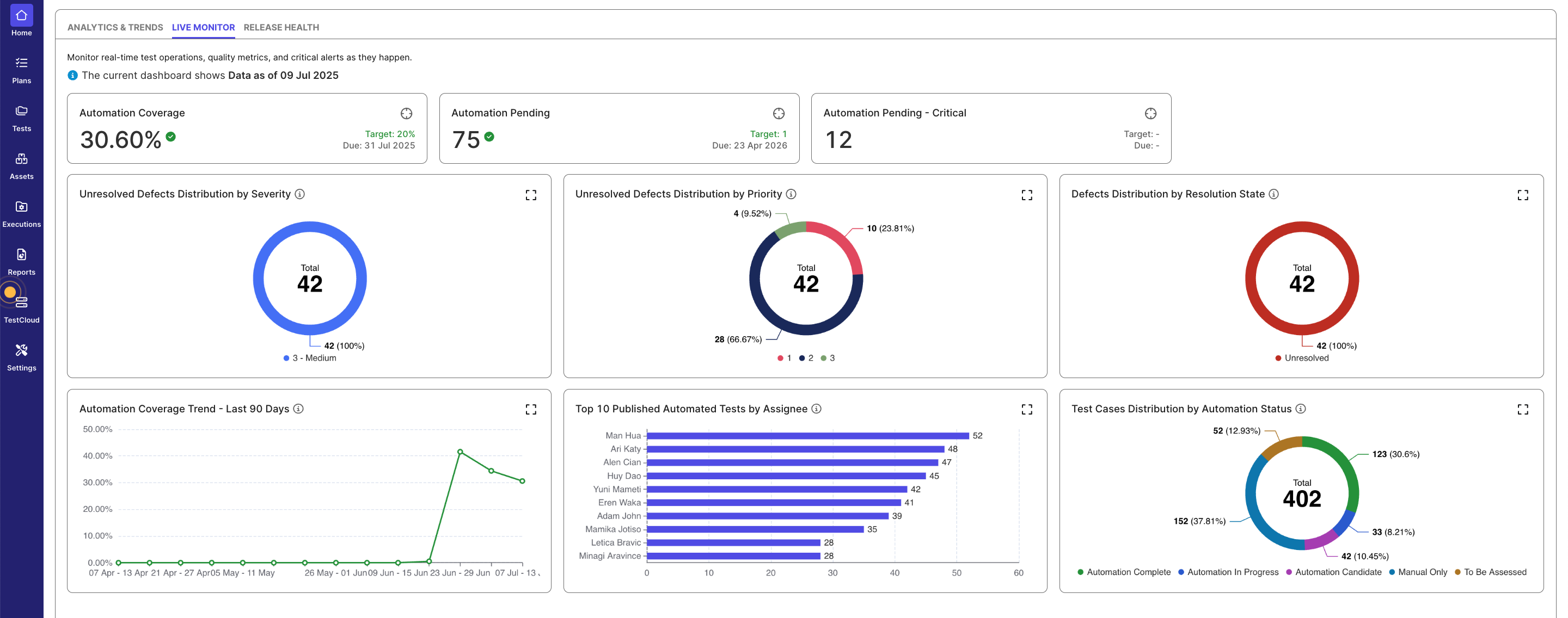
We’ve added a Live Monitor tab to Katalon TestOps — a real-time dashboard designed to give you instant visibility into test automation metrics, defect trends, and test coverage. This helps teams stay aligned, respond to issues faster, and make informed release decisions.
July 1, 2025
New features
- Katalon now automatically enforces license limits when your assigned users exceed your purchased seats, helping your team stay compliant. You’ll need to:
- Reduce assigned users within 30 days.
- Reallocate licenses between organizations within 7 days.
- If no action is taken:
- Extra users will be automatically deactivated based on usage.
- Organization-level license allocations will be reset to default.
- Introduced Application Under Test (AUT) as a new configurable object across TestOps. Currently, this supports seamless integration with TrueTest in the platform. See this document for more information.
June 30, 2025
New features
- Added
Automation Statusfield to test cases to track their automation lifecycle. This helps QE teams assess automation coverage and generate actionable metrics. - Added
Priorityfield to help teams assess and triage test case importance. This enables better planning and ensures critical test coverage is addressed first. - Test case import updates:
- Test case import now supports the new Automation Status and Priority fields, allowing teams to populate them during import.
- Added support for importing ALM linkages as part of the test case import process. This allows teams to include associations with ALM requirements, defects, or other artifacts directly during import, streamlining integration and reducing the need for manual linking post-import.
- Enhanced Smart Import flow to support defining a location path for test cases during import. This preserves folder structure and makes post-import organization seamless.
June 11, 2025
New features
-
Jira Integration: Connect TestOps directly with Jira to enable automatic requirements mapping, improved sprint and release planning, and one-click defect creation from test results. This eliminates manual updates and enhances traceability across the testing lifecycle.
-
Repository Integration for Azure Repos, GitLab, and Bitbucket: Extend test case management beyond GitHub with support for additional platforms. Features include bi-directional synchronization, direct test case edits from TestOps, and seamless version control—helping teams work efficiently within their preferred development stacks.
June 5, 2025
New features
- Manual testers can now add notes to individual test steps during TestPak executions, enabling precise documentation of actual results, issues, and observations. This enhancement provides developers with clearer context about what occurred during test execution, facilitating faster issue resolution.
June 4, 2025
New features
- Introduced the new Defect Analysis report, featuring interactive pie charts that visualize defect distribution by severity, priority, and resolution state. The report defaults to showing unresolved defects and includes a detailed data table for deeper insights into current issues.
Enhancements
- Improved interactivity in the Test Failures Analysis bar chart. A vertical guideline now appears on hover, and tooltips can be triggered in the space above each bar for a more intuitive experience.
- Added advanced filters to the Defect Analysis report, including a new "Current" scope option that shows real-time defect status by default. Users can now filter by time, sprint/release, reporter, severity, priority, and resolution state to focus on relevant subsets of defect data.
- Added advanced filters to the Defect Analysis report, including a new “Current” scope option that shows real-time defect status by default. Users can now filter by time, sprint/release, reporter, severity, priority, and resolution state to focus on relevant subsets of defect data.
- Also added a description panel to the report for improved clarity on its purpose and scope.
- Added standard interactions to the Defect Analysis report. Users can now hover for tooltips, click pie chart slices to filter data, and drill down into detailed tables. Clicking a defect row opens its full detail view, with support for sorting and pagination.
May 21, 2025
New features
- Introduced Custom AI Prompt for Test Case Generation. This allows you to add text-based instructions that guide the AI in generating more relevant, domain-specific test cases tailored to your testing requirements.
- Introduced Step-Level Attachments in TestPak. This enables you to attach files directly to individual manual test steps, providing enhanced clarity and comprehensive issue documentation throughout your testing process.
- Introduced the Requirement Traceability Report, a key feature bridging TestOps Legacy and TestOps' capabilities. This new, comprehensive report shows relationships between requirements, test cases, test executions, and defects in a unified table view.
May 15, 2025
New features
- Introduced AI-powered Visual Testing, which allows you to detect visual regressions in an application. Baseline collections can be managed and ignore zones can be set.
- Introduced TestCloud Live Testing License Management. This allows Account Admins to manage or allocate these licenses across Organizations within an Account, providing better visibility and control.
- Introduced TestCloud Live Testing License Utilization, which allows Account Admins to monitor the utilization of these licenses.
Enhancements
- Enhanced Test Suite management with Git Integration. This allows you to synchornize test suites between Katalon Studio and Katalon TestOps directly for a more seamless experience.
April 23, 2025
Katalon TestOps has been updated with new features and enhancements.
New features
- Introduced a new license tracking feature that provides visibility into allocation and usage across organizations and users.
- Introduced a dedicated TestCloud configuration area directly within TestOps, allowing for easier management of TestCloud-related features.
Enhancements
- Refined permissions for Non-TestOps Admins, now allowing them restricted access to TestOps-specific settings, where an enhanced user experience prevents misconfigurations and enhances security.
- Implemented major improvements to dashboards and reports, enhancing usability and performance.
- Enhanced dashboard usability with customizable empty states, improved widget layouts, smarter default values, and clearer data visualizations for faster onboarding and better insights.
- Improved reporting with better test case distribution insights, clearer empty states, streamlined filters, and faster loading on the Test Run Detail page.
April 16, 2025
Katalon TestOps' TestPak has been updated with new minor features.
New features
- Added the ability to stop generating a test case should it take too long.
April 2, 2025
A new version of Katalon TestOps has been released! 🎉
TestOps is a unified platform that integrates manual, automated, and AI-generated testing capabilities to provide comprehensive testing solutions. You gain complete end-to-end visibility across projects, teams, and releases, allowing you to monitor quality metrics, readiness status, and progress from a single consolidated interface. The platform is engineered to minimize quality-related costs by reducing the time and resources typically required for test creation, ongoing maintenance, and team coordination activities. TestOps incorporates built-in artificial intelligence that automatically generates test cases to enhance coverage and ensures all tests maintain full traceability to business requirements. This alignment between testing activities and business objectives enables you to accelerate development cycles while maintaining confidence in your product quality.
This new version introduces a modernized interface and enhanced capabilities to improve your test automation management experience.
There are currently two versions of Katalon TestOps available:
TestOps
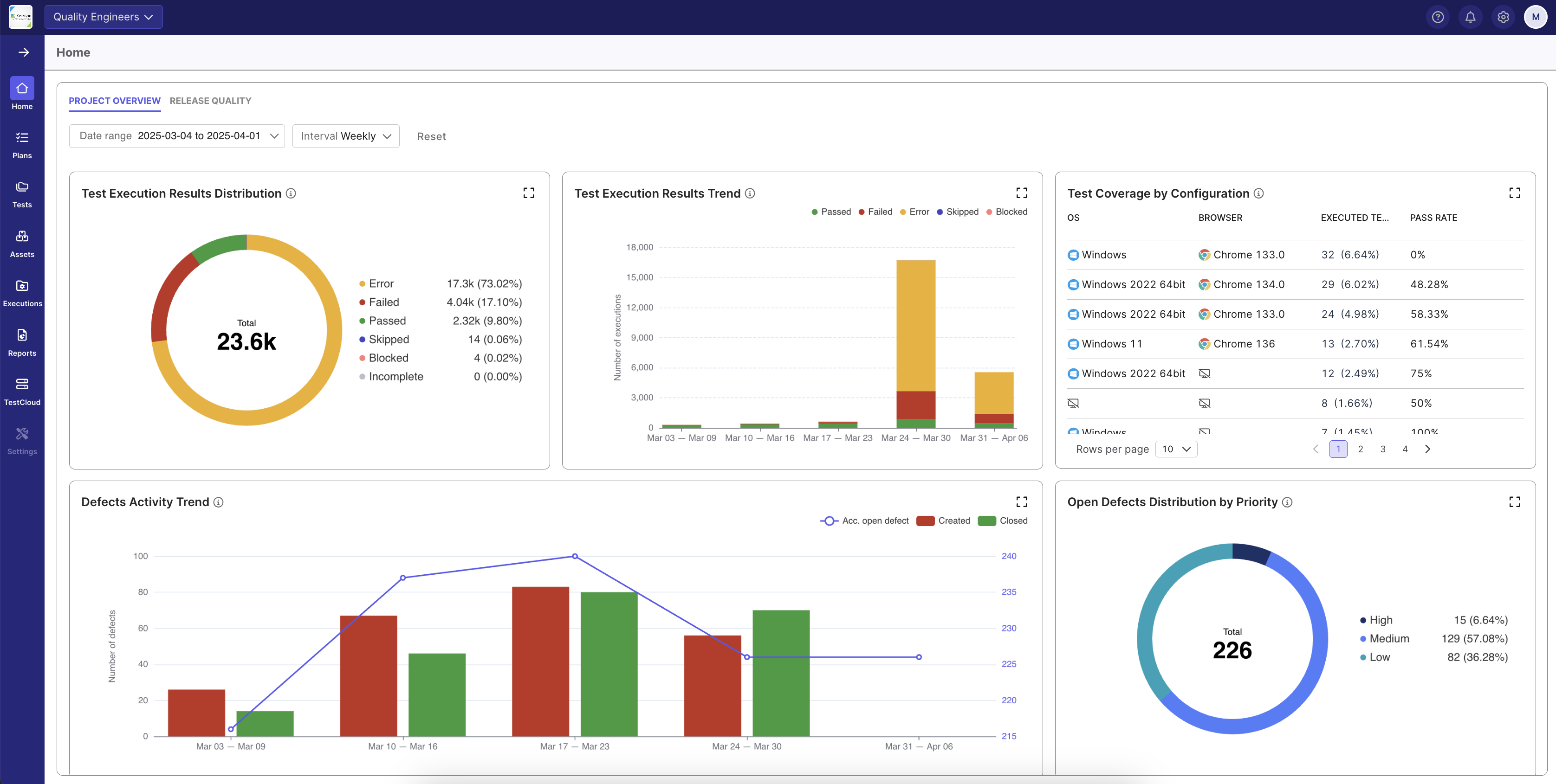
The Katalon TestOps' new home page within a Project.
TestOps Legacy
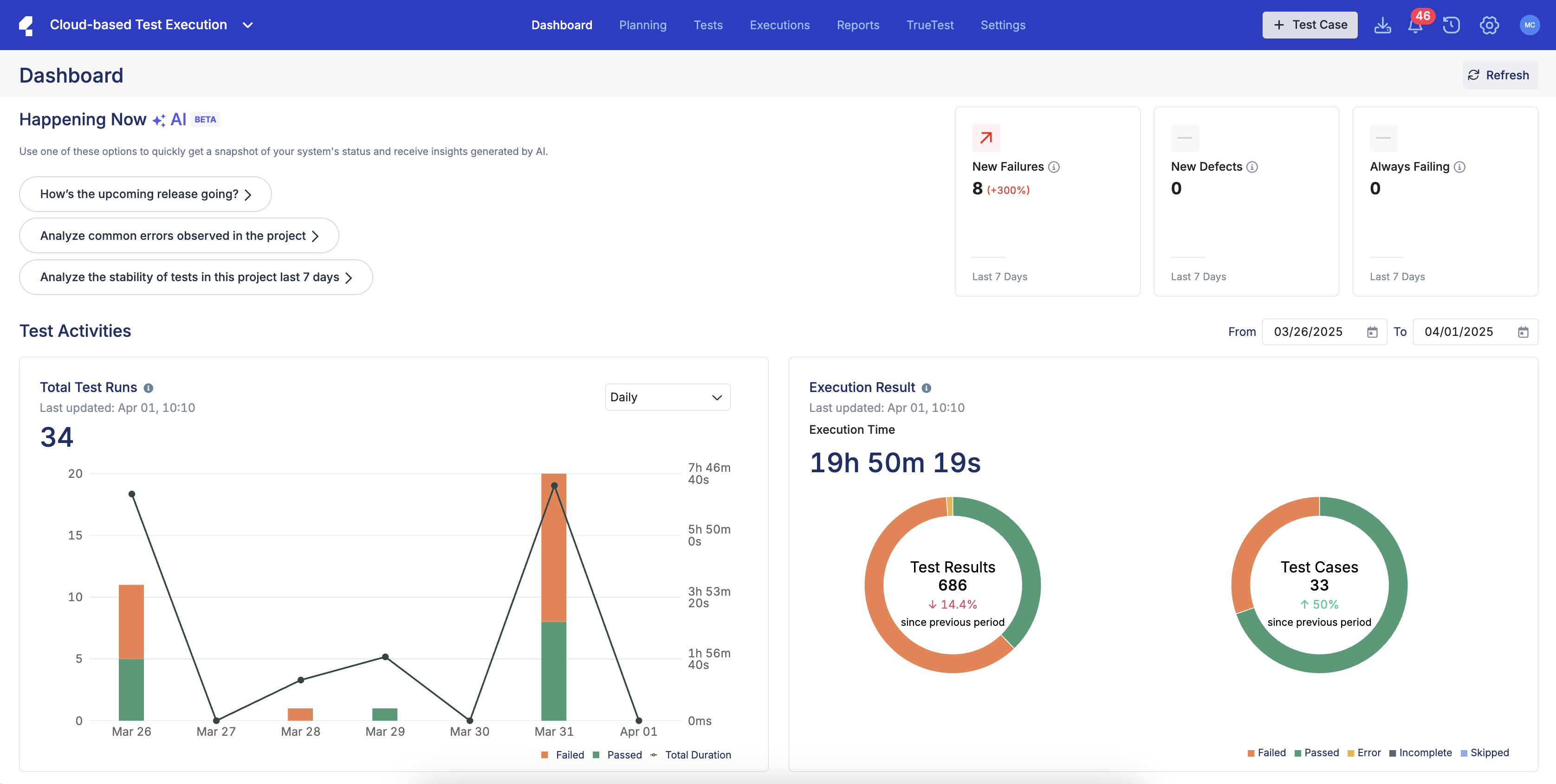
The Katalon TestOps Legacy home page within a Project.
You can still access your information from the previous version (TestOps Legacy) and continue using it as usual.
Documentation for both versions can be found in the Katalon TestOps section.
- Documentation for the new version of TestOps is temporarily marked as "alternate" in some sections. This will be removed. Then, TestOps Legacy will be referred to as such.
March 26, 2025
Katalon TestOps has been updated with new features and enhancements.
New features
- Introduced KSE release alerts.
- Introduced a seamless integration between TestOps and GitHub.
- Introduced the ability to link existing test cases to requirements.
- Introduced the ability to link specific releases or sprints to test runs.
- Added Iteration (Sprint/Release) filtering to key reports.
- Introduced AI-assisted test case generation from a requirement.
- Introduced in-app notifications for the executor of manual test schedule updates.
- Introduced the ability to associate manual test runs with a specific sprints.
Enhancements
- Integrated the new configuration for AI services menu.
- Enhanced tracking for KRE and TestCloud License Utilization.
- Expanded the GitLab repostory Integration support at both system and project levels.
- Customer-Driven UX Enhancements:
- Chart/data table interaction improvements for Test Execution and Test Case Activity reports
- Auto-apply local filters in Dashboards
- Quick data preview with expandable widgets
- New dashboard reset functionality
- Enhanced report organization
- Optimized query performance for release quality dashboard
March 19, 2025
Katalon TestOps' manual execution section has been updated with new features, enhancements, and general bug fixes.
New features
- Added executor notifications for test runs:
- Instant notifications when assigned as a test run executor
- Automated 15-minute reminders before scheduled test runs
March 5, 2025
Katalon TestOps has been updated with new features and general bug fixes.
New features
- Added the ability to specify the KRE version during test run creation, allowing for better control over test execution environments.
- Upgraded Jira Plugin to Jira DC 10.3.x.
- Added the ability to deep-dive from the Release Quality Dashboard into detailed reports.
- Added the ability o highlight relevant metrics that correspond to a certain quality crtieria in the Release Quality Dashboard.
Bug fixes
- Fixed errors with the Schedule Details interface.
- Resolved general UI issues.
February 19, 2025
Katalon TestOps has been updated with new features, enhancements, and general bug fixes.
New features
- Added the ability to manage a Github integration.
- Added the ability to manage KRE dedicated licenses for Organizations.
- Added the ability to edit manual test runs that have been scheduled. Users can modify anything from selected test suites, configurations, the assigned test executor, test run name, etc. (Note: test runs that are past its planned start time cannot be rescheduled.)
- Added the feature for executors to receive notification upon being assigned to a test run.
- Added the feature for executors to receive reminders prior to scheduled test runs.
- Added the Release Quality Dashboard: A new feature that provides a comprehensive view of release performance metrics, helping teams streamline their release management workflow.
Enhancements
- Fixed accessibility issues for TestPak, the Create a Manual Test Run page, and the View Results page.
- Added internationalization to the Manual Editor.
- Enhanced the Schedule Details interface with a new UI.
Bug fixes
- Fixed errors related to the internal portal.
- Fixed errors related to project integrations.
- Fixed errors related to license management.
- Fixed errors related to system integrations.
- Resolved various UI inconsistencies.
- Improved system stabilty and performance.
- Fixed errors related to the Release Quality Dashboard and Home widgets.
February 7, 2025
Katalon TestOps' manual executions have been updated with new features and general bug fixes.
New features
- Added the ability to assign an executor for a manual test run.
- Added the ability to select a release version for a manual test run.
Bug fixes
- Fixed an error where the test case duration count continued even after a test run's end.
- Fixed an error where a user without the correct permissions could update test cases.
- Fixed an error where switching manual test cases while uploading attachments could cause errors.
- Fixed general UI errors.
January 22, 2025
Katalon TestOps has been updated with new features for the Home Dashboard and bug fixes.
New features
-
Replaced statistics widget with pie charts for more intuitive data visualization. Impacted reports are:
- Test execution during period by status
- Total defect during period by status
- Test case activity during period by status
-
Implemented pie chart widgets for the Home Dashboard for the following statistics:
- Execution Summary
- Open Defects by Priority
- Published Test Cases by Type
-
Bar charts now support weekly Intevals, allowing for a clearer view of test execution trends.
Bug fixes
- Fixed an error where the Test Execution Result Report chart displayed incorrectly when there was no data.
- Optimized the page loading time for the Requirement Coverage report.
- Fixed a bug with the Configuration Coverage Report imporperly showing data after filtering.
- Fixed general UI issues.
January 15, 2025
Katalon TestOps has been updated with new features, enhancements, and general bug fixes.
New features
- Added the ability to schedule a manual test run, allowing for planning and better test execution efficiency.
- Introduced multiple licensing Report Features designed to enhance visibility for license usage.
- Introduced the Seat-based: KSE License Usage chart that displays license assignment and activity trends over time.
- Introduced the Seat-based: KSE License Assignment and Activation History chart that displays license allocation and usage trends.
- Introduced the Seat-based: KSE Assignment Details table that displays actionable insights into individual license allocations and usage activity.
- Introduced API support for manual testing, allowing for the creation or cancellation of manual test schedules.
Enhancements
- Automation Executions have been improved:
- Scheduled test run times can now be edited.
- Completed test runs can now be re-run to facilitate faster validation.
Bug fixes
- Fixed general UI errors.
- Fixed general permission issues.
- Fixed an error where scheduled test runs did not follow its automated start time.
- Fixed an error where the Jira integration could not be turned off in TestOps (original).
- Fixed an error where ALM projects wouldn't switch properly.
- Fixed an error where ADO requirements could not be linked to test case detail.
January 8, 2025
Katalon TestOps has been updated with new features, enhancements, and general bug fixes.
New features
- Added the Configuration Coverage Report to provide users a detailed assessment of test coverage across various platforms within the Katalon software ecosystem.
- New dashboard widgets have been added to the Home Dashboard to provide users with a more comprehensive overview of their test statuses and results:
-
Test Execution Result Trend: track daily test execution results with breakdown of passed, failed, error, incomplete, blocked, and skipped tests.
-
Execution Summary: view distribution of test results across all statuses with total execution count and percentages.
-
Test Configuration Top Coverage: monitor test execution coverage across operating systems and browsers with execution count.
-
Open Defects by Priority: view total defect count categorized by priority levels (High, Medium, Low).
-
Defect Activity Trend: track created, closed and accumulated open defects over time with daily breakdown.
-
Published Test Cases by Type: view published test cases categorized by type (Manual only, Automated only, Manual & Automated).
-
Test Case Activity Progress: monitor test case activity showing workflow progression from Draft to Published status.
-
- Added the Azure DevOps Integration to allow users to sync their Azure DevOps projects with TestOps.
- Added the ability to archive and unarchive ADO project configurations.
- Added the ability to edit ADO project configurations for enhanced flexibility.
- Added the ability to pull configurations from ADO.
- Added the ability to create, edit, or disconnect an ADO integration.
Enhancements
- The Project Dashboard has been renamed to the Home Dashboard.
- The Home Dashboard filter has been changed:
- Default time range is now the last 28 days
- Users can select a sprint as a time range
- Users can adjust time intervals for better data grouping
- The filters for Profile and Release have been removed
-
Enhanced permissions for the Member role, allowing for better role-cased acccess control.
-
Simplified the User Profile by removing the phone number field.
-
Automated Executions have been improved:
- Scheduled test runs can now be viewed in a full list with detailed insights.
- Scheduled test runs can be run immedaitely using the Run Now option or cancelled if needed.
- Scheduled test runs' configurations can be edited dynamically.
- Added the ability to terminate a running test run, allowing for more granular control over execution processes.
Bug fixes
- Fixed multiple erros when scheduling or interacting with scheduled test runs.
- Fixed an error with the Requirement Coverage report showing incorrect data when filtering by release for the first time.
- Fixed an error with the Requirement Coverage report not showing Jira IDs.
- Fixed an error with Configuration Coverage report where the local date range filter did not correctly update alongside the global date range filter.
- Fixed an error where reports were not generating properly.
- Fixed general backend errors.
- Fixed general user permission errors.
- Fixed general UI errors.
- Fixed general licensing errors.
- Fixed an error where TestOps would not run with a local agent when choosing Visual Interface.
January 6, 2025
Katalon TestOps has been updated with new features, enhancements, and general bug fixes.
New features
- The Create Manual Test Run UI has been completely overhauled to streamline the user experience and match consistency with Automated test run workflows.
- Users can now log defects directly within TestPak for more seamless defect management.
Enhancements
- Added support for Comments and Attachments in TestPak.
- Added support for similar keyboard shortcuts with Excel to improve user experience.
Bug fixes
- Fixed an error with TestPak where videos couldn't be downloaded in full.
- Fixed an error with user permissions regarding test case management.
- Fixed general UI errors.
December 5, 2024
Katalon TestOps has been updated with a new report type and general bug fixes.
New features
- The Test Case Activity During Period by Status Report has been introduced. This new report empowers users to better manage and analyze their test case workflows, ensuring improved organization and efficiency.
- Track Test Case Activity: Monitor test cases created or updated within a specific time period or during a single sprint.
- Comprehensive Status Insights: Gain visibility into test case statuses, including Draft, Ready for Review, In Review, and Published, for a clear understanding of the test case management process.
- Manual vs. Automated Classification: Identify test cases as either manual or automated.
November 27, 2024
Katalon TestOps has been updated with two new features and general fixes.
New features
- The Test Execution During Period by Status Report has been introduced. This new feature enhances visibility into test progress and supports better-informed decision-making with:
- Visual Charts: Gain insights with clear, visual representations of test execution results during a specified time period, categorized by status.
- Customizable Dashboard Integration: Add this report directly to your project's dashboard for streamlined access and effortless monitoring of test execution trends.
- TestPak has been updated so users can view test results during an execution.
- System integrations are now shown in a list.
October 16, 2024
The newest iteration of Katalon TestOps has been launched.
New features
- Users with a TestOps Guest license can access the User Profile, User Settings, Dashboard, and Reports.
Enhancements
- Account Admins can resend or copy the invitation link for users with Pending status in User Management.
- Minor UI enhancements in the User Management page.
October 10, 2024
The newest iteration of Katalon TestOps has been launched.
New features
This minor TestOps update includes new features aimed at enhancing general administrative functions, as well as minor enhancements and bug fixes.
- Users can:
- Verify or remove Business Domains from their Account.
- Account Admins can:
- Manage all Projects in their Account.
October 2, 2024
The newest iteration of Katalon TestOps has been launched.
Enhancements
This minor TestOps update includes features aimed at enhancing general functions to make them easier to work with.
- Test case search improvement: Users can now locate specific test cases via their IDs, simplifying the search process especially for large projects.
- Test suite search improvement: Users can now more easily locate test cases when building test suites.
- Sprint/release timeline auto-sync: Sprint, release, and requirement updates from Jira now automatically sync with TestOps, ensuring the latest information is always shown without manual intervention.
- Bulk selection for test cases: Users can now select all test cases in the test case table for quick bulk actions like move or delete.
September 18, 2024 - GA
The newest iteration of Katalon TestOps has been launched.
New features
-
View Jira releases or sprints in TestOps:
TestOps now features a real-time release and sprint timeline within the Plans section. This seamless integration with Jira ensures you can easily stay up-to-date with the latest project schedules directly within TestOps. -
View requirements and assign testers:
Within the timeline, users can click on sprints or releases to view linked requirements. QE leads can assign testers to these requirements for improved test coverage. -
Create test cases from requirements and link them together:
Test cases can be created directly from the requirement detail page, establishing an automatic, editable link between the test case and the requirement. -
Enter manual test case results:
Users can easily input test case outcomes for manual test executions and then view the results in reports. -
View the manual execution list:
A consolidated list now houses all manual executions, providing a single location to view them.
August 28, 2024 - Beta 3
The Beta 3 iteration has been launched. This update introduces manual test step generation for test cases and a user detail page for enhanced administration, as well as improvements to the test run search bar and overall loading times.
New features
-
Generate test steps with AI:
A test case's steps can now be automatically created using AI, speeding up test development. -
Administrate individual users:
Enhancements
- Test Run list search enhancement:
Test runs can now be searched by their test run ID or name. - Performance fixes:
Improved loading times for Reports and the Dashboard.
July 24, 2024 - Beta 2
The Beta 2 iteration has been launched. This update introduces sub-organizations, the User Management page, the Project Dashboard, and UI enhancements related to manual test case creation.
New features
This update includes features aimed at refining organizational functions, enhancing manual test case generation, and improving analytics monitoring via the Project Dashboard.
-
Organizational nesting:
An organization can now contain sub-organizations, allowing flexible hierarchical structuring within accounts. -
User management:
The new User Management page lists all users and their information, allowing admins to quickly locate users via search or filtering. -
Project Dashboard:
A customizable page with widgets that provides a bird's eye view of test statuses or results. -
New manual test case editing features:
The following functions have been added:- Wrap text for multiple lines within a cell.
- Cut, copy, or paste content in steps.
- Live hyperlinks in steps.
- Undo and redo actions (up to 20).
- Tab key navigation between rows.
- A help menu explaining all supported shortcuts.
June 26, 2024 - Beta 1
The Beta 1 iteration of TestOps 3 has been launched. This update enables users to create, edit, and manage test cases, executions, and reports, as well as administer organizations and projects—all within a streamlined interface.
Introducing Katalon TestOps Gen 3
- This update introduces enhanced features aimed at refining test management processes, providing more granular user permission capabilities, and enhancing data visualization functions.
- Significant modifications to core testing workflows have been implemented to improve usability and efficiency.
- The user interface (UI) has been redesigned for more intuitive navigation and task execution.
End of Release Notes